반응형

📜 문서 개정 이력
| 날짜 | 제목 | 상세 |
| 2026-04-14 | 초안 작성 | 최초 메뉴얼 포스팅 |
💁🏻♂️ 테크팀 채널 소개
테크팀 채널은 누구나 친구들과 함께 즐길 수 있는 사설서버를 구축하기 위한 강의를 제공하기 위해 만들어졌습니다.
아래와 같은 다양한 공식 자료를 확인하실 수 있습니다.
| 제목 | 링크이동 |
| 테크팀 유튜브 채널 | 링크이동 |
| 테크팀 디스코드 | 링크이동 |
| 테크팀 매뉴얼 정리 | 링크이동 |
📔 본게임과 관련한 테크팀채널 다른 자료모음
| 제목 | 링크이동 |
| 서버 구축 영상모음 | 링크이동 |
| 자주하는 질문모음 | 링크이동 |
유튜브 가이드 영상

Step1 : 공유기 포트포워딩 진행
다음 포트를 서버PC의 내부 IP로 포트포워드 진행함
| 번호 | 포트번호 | 프로토콜 | 사용 용도 |
| 01 | 7777 | UDP | 게임데이터 전송용 |
| 02 | 27015 | UDP | 서버 쿼리용 |
| 03 | 18888 (옵션) | UDP | 관리 텔넷 접속용 |
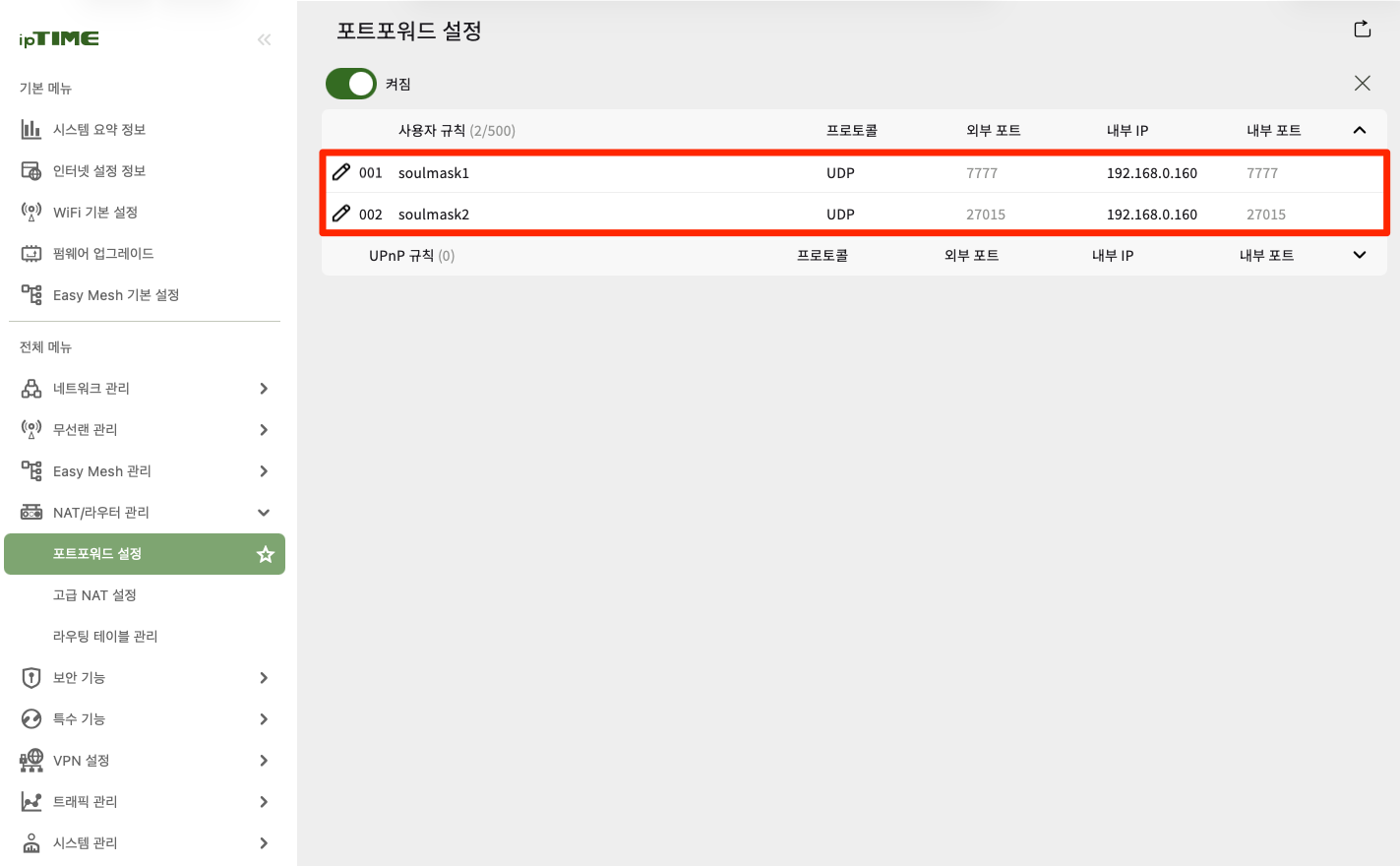
IPTime이 아닌 다른 공유기 브랜드별 포트포워딩 유튜브 자료
| 번호 | 브랜드 | YouTube 링크 |
| 1 | IP Time 공유기 | 링크이동 |
| 2 | KT 공유기 | 링크이동 |
| 3 | TP Link 공유기 | 링크이동 |
| 4 | Next 공유기 | 링크이동 |
| 5 | SK 브로드밴드 공유기 | 링크이동 |
| 6 | LG U+ 공유기 | 링크이동 |
| 7 | ASUS 공유기 | 링크이동 |
Step2 : 윈도우 방화벽 개방
New-NetFirewallRule -DisplayName "SoulMask" -Direction Inbound -LocalPort 7777,27015 -Protocol UDP -Action Allow| 포트번호 | 프로토콜 | 사용용도 |
| 7777 | UDP | 게임데이터 트래픽 |
| 27015 | UDP | 게임쿼리 트래픽 |
Step3: 게임서버 설치
SteamCMD 다운로드
Making sure you're not a bot!
Loading... You are seeing this because the administrator of this website has set up Anubis to protect the server against the scourge of AI companies aggressively scraping websites. This can and does cause downtime for the websites, which makes their resour
developer.valvesoftware.com

update.bat 생성
steamcmd.exe +login anonymous +app_update 3017310 +quit
pause
Step4 : 서버 구동
start.bat
cd ".\steamapps\common\Soulmask Dedicated Server For Windows"
start WSServer.exe DLC_Level01_Main -server -log -UTF8Output -MULTIHOME=0.0.0.0 -EchoPort=18888 -forcepassthrough -SteamServerName="MyServerName" -MaxPlayers=70 -Port=7777 -QueryPort=27015 -adminpsw=1234 -PSW=1234
exit /B
반응형
'게임 서버구축 메뉴얼 > 소울마스크' 카테고리의 다른 글
| [소울마스크] DLC 서버 구축 : 구글클라우드 (0) | 2026.04.18 |
|---|---|
| 소울마스크(SoulMask) 싱글플레이에서 관리자 패널 열기 (1) | 2024.06.06 |
| 소울마스크(SoulMask) 텔넷 터미널 사용법 (1) | 2024.06.04 |
| 소울마스크(SoulMask) 데이터 백업 및 이관(마이그레이션) 하기 (1) | 2024.06.04 |
| 소울마스크(SoulMask) 서버 환경설정 하기 (1) | 2024.06.02 |